Questions
1. What is Authenticate ?
2. What does Authenticate validate?
3. Are there restricted or prohibited business types for Authenticate?
4. Does Authenticate satisfy Nacha requirements or replace a merchant’s existing compliance and fraud prevention responsibilities?
5. Which merchants are the strongest candidates for Authenticate (AOA)?
6. What are the Authenticate billing codes?
7. How can customers submit Authenticate transaction requests?
8. What are the differences between Validate, Validate+, Authenticate/ Account Ownership Authentication (AOA), and PaymentsProtection.ai (PP.ai)?
9. Can Authenticate be used together with Validate, Validate+ or PP.ai?
10. Are Authenticate declined transactions handled the same way as Validate or Validate+ declined transactions?
11. What is AuthenticateMe?
11.1. Is AuthenticateMe the same as Authenticate?
11.2. When is an AuthenticateMe micro-deposit triggered?
11.3. Under what MID are AuthenticateMe micro-deposits generated?
11.4. What happens if micro-deposits expire or are deleted?
12. Why is CSG Forte automatically enrolling eligible customers in the Authenticate service?
13. Who should merchants contact if they have questions about Authenticate or the “Auto-Enrollment” program?
1. What is Authenticate? |
Authenticate is an optional “Bank Account Owner Verification” service enabled upon customer request. It uses Early Warning’s Account Ownership Authentication (AOA) capability to verify whether a bank account belongs to the intended individual or business by comparing the submitted name with account-owner information. Authenticate is especially relevant for ACH credits, payouts, reimbursements, claims, refunds, and other disbursements, helping reduce account-ownership fraud, misdirected payments, and payment errors.
2. What does Authenticate validate? |
|
|
Authenticate validates bank account ownership. It supports verification for individuals using first name and last name, and for businesses using business names. The service uses fuzzy logic and may return a response when first name, last name, or business name entries have minor variations from the exact record. Typical response groupings are:
- Positive: overall match
- Conditional: partial or conditional match
- Negative: no matching information or no information found
3. Are there restricted or prohibited business types for Authenticate? |
|
|
Yes. Authenticate eligibility is subject to CSG Forte’s Prohibited Business Types requirements. Other business types may also be deemed higher risk and become subject to additional review or requirements.
4. Does Authenticate satisfy Nacha requirements or replace a merchant’s existing compliance and fraud prevention responsibilities? |
|
|
No. Authenticate may support a merchant’s fraud prevention and risk management efforts, but it does not by itself ensure compliance with Nacha Operating Rules or other legal or regulatory requirements. It also does not replace the merchant’s responsibility to maintain appropriate fraud prevention controls, policies, procedures, and compliance programs.
5. Which merchants are the strongest candidates for Authenticate (AOA)? |
|
|
Strong candidates are eligible merchants that originate ACH credits, including payouts, reimbursements, claims, refunds, or other disbursements, and need to verify that the receiving account belongs to the intended individual or business.
Note: Eligibility and activation remain subject to CSG Forte requirements, Early Warning review, applicable onboarding requirements, and prohibited-business restrictions. ACH activity alone does not guarantee eligibility or enrollment.
6. What are the Authenticate billing codes? |
|
|
Authenticate uses these billing codes:
- AUTH: Authenticate per-transaction fee
- AUTHM: Authenticate monthly fee
Notes:
- Both fee codes can be set to 0.00 and both are commissionable.
- Authorized users can add, change, or remove product fee codes for “Bank Account Owner Verification” – Authenticate in portfolio Buy Rates.
- Authenticate can be selected for new and existing Rate Plans.
7. How can customers submit Authenticate transaction requests? |
|
|
Customers can initiate an Authenticate transaction through the REST API or Dex.
- In the REST API, Authenticate requires a subscription and uses the /transactions/authenticate endpoint. Requests must use Basic Auth over HTTPS and include the X-Forte-Auth-Organization-Id header.
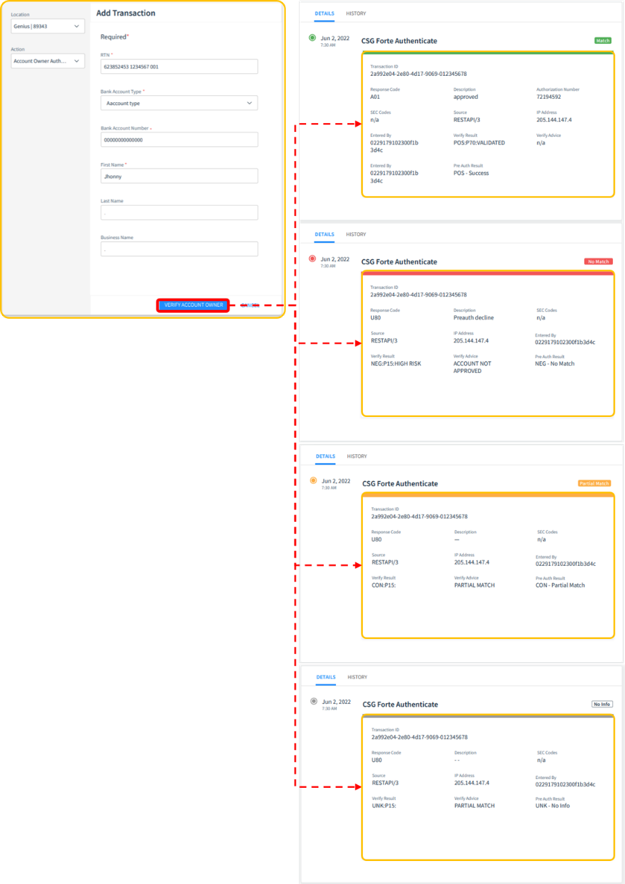
- In Dex, users can submit an Authenticate request from Add Transaction by selecting Account Owner Verification and entering the required bank account and name fields, such as RTN, Bank Account Number, Bank Account Type, First Name, Last Name, and Business Name. At the end, it will show the result of the validation as shown below:
8. What are the differences between Validate, Validate+, Authenticate/ Account Ownership Authentication (AOA), and PaymentsProtection.ai (PP.ai)? |
|
|
Validate and Validate+ verify account status and related risk indicators. Authenticate is CSG Forte’s account-ownership verification service, powered by Early Warning’s AOA capability. PaymentsProtection.ai (PP.ai) provides broader monitoring of payment behavior and fraud patterns.
9. Can Authenticate be used together with Validate, Validate+ or PP.ai? |
|
|
Authenticate can be configured in the following ways:
- Authenticate only
- Validate and Authenticate
- Validate+ and Authenticate
- PaymentsProtection.ai can coexist with Authenticate, Validate, or Validate+ and does not have any service combination restrictions.
Note: Authenticate is a separate verification service and does not combine Validate or Validate+ into a single transaction action. Validate or Validate+ transactions and Authenticate transactions must be posted separately.
10. Are Authenticate declined transactions handled the same way as Validate or Validate+ declined transactions? |
|
|
No. For Validate and Validate+ transactions, decline advice may be available through Webtools. For Authenticate transactions, teams must review the transaction response and preauthorization result information in Dex to determine the cause of the decline.
11. What is AuthenticateMe? |
|
|
AuthenticateMe is the micro-deposit verification process used to verify certain bank account changes or unknown Email/Routing and Transit/Account Number combinations. Micro-deposits must be validated within seven calendar days or they expire.
11.1. Is AuthenticateMe the same as Authenticate? |
|
|
No. Authenticate is the “Bank Account Owner Verification” service used to verify account ownership. AuthenticateMe is a micro-deposit verification process used in specific account authentication scenarios.
11.2. When is an AuthenticateMe micro-deposit triggered? |
|
|
An AuthenticateMe micro-deposit can be triggered when a user changes the bank account listed on the merchant application in Webtools, adds an application in MA online, or sends an unknown Email/Routing and Transit/Account Number combination to TripleCheck.
11.3. Under what MID are AuthenticateMe micro-deposits generated? |
|
|
AuthenticateMe micro-deposits created by MAM or from a TripleCheck transaction are generated under MID 134163.
11.4. What happens if micro-deposits expire or are deleted? |
|
|
- If the first set expires and the account holder tries again, a second set is generated.
- If the second set is not authenticated, the Email/Routing and Transit/Account Number combination is set to failed.
- A developer can manually delete micro-deposits to force a new set.
- If the second set is deleted, the authentication is also set to “Failed”.
12. Why is CSG Forte automatically enrolling eligible customers in the Authenticate service? |
|
|
To enhance our customers' experience, we are expanding adoption of this service to help ensure that the account holder associated with your transactions can be validated. This helps reduce the need for manual reviews, reprocessing, and potential transaction issues, including Proof of Authorization (POA)-related exceptions.
As part of this initiative, we will be automatically enrolling eligible customers in the service through a phased rollout. You will receive a communication when your organization is scheduled to participate, including detailed instructions and any required next steps.
Note: As part of the enrollment process, you will be asked to provide a current W-9 and other required information to complete your enrollment.
13. Who should merchants contact if they have questions about Authenticate or the “Auto-Enrollment” program? |
|
|
Merchants with questions about Authenticate, service activation, billing, eligibility, or the “Auto-Enrollment” program should contact their CSG Forte representative or Customer Service team for assistance. Support is available at customerservice@forte.net or calling to 866-290-5400, Option 1.
Was this article helpful?
That’s Great!
Thank you for your feedback
Sorry! We couldn't be helpful
Thank you for your feedback
Feedback sent
We appreciate your effort and will try to fix the article