Questions
1. What is MFA?
2. What are the MFA benefits?
3. Is a password still required to access Dex when MFA is enabled?
4. How does MFA work?
5. How to update the phone number used for MFA?
6. Are there options for MFA that do not require a phone number?
7. What to do if the registered phone number for MFA is unavailable?
8. Is it possible to remain logged in longer to reduce MFA prompts?
9. How to provide feedback on the MFA process?
1. What is MFA? |
Multi-Factor Authentication (MFA) is a security mechanism designed to strengthen your account protection by requiring two or more independent verification factors before granting access to a system or application. Instead of relying solely on a username and password, MFA adds an extra layer of security to enhance the information protection and reduce the risk of fraud by incorporating different categories of authentication, including something you know (such as a password), something you have (such as a mobile device or authenticator application), and information linked to you (such as your phone number), to ensure only you can access your account.
2. What are the MFA benefits? |
|
|
MFA is essential to add a robust layer of protection beyond traditional passwords, which are increasingly vulnerable to cyber threats. CSG Forte is committed to safeguarding the security and privacy of our systems, data, and users by requiring a verification code sent to a device accessible only by you, MFA reduces the risk of unauthorized access, phishing, and identity theft.
• Enhanced Security: MFA reduces the risk of unauthorized access, even if one of the authentication factors (e.g., password) is compromised.
• Protection against phishing: Even if attackers steal a password, they will still need the second factor to gain access.
• Compliance: Many regulations and industry standards, such as GDPR, HIPAA, and PCI-DSS, require the use of MFA to protect sensitive data.
3. Is a password still required to access Dex when MFA is enabled? |
|
|
MFA does not affect current password Dex policies applied to your account as it is an additional security measure. To ensure the current password is secure it:
• Must be at least fourteen characters long
• Must have one uppercase letter
• Must have one lowercase letter
• Must have one number
• Must have one symbol
• Shall be different from the user's login name
• Cannot contain three consecutive, identical characters (alphabet, number, or special characters)
4. How does MFA work? |
|
|
The Dex MFA system follows a two-factor authentication process. First, the you enter your username and password and that will trigger a verification process (Unless the "Remember Me" feature option is selected), which consist of sending a unique code to your registered phone number via SMS or voice call depending on your preferences (second authentication factor). You must enter this code on the Dex login screen to complete authentication. If the code matches, access to the account is granted.
Note: MFA authentication codes can be delivered by either SMS (text message) or Voice (phone call). Due to security, SMS delivery is limited to phone numbers classified as mobile devices and is not supported for all phone types. Voice delivery is available for all phone types (including VoIP numbers) where supported by the phone number's region.
5. How to update the phone number used for MFA? |
|
|
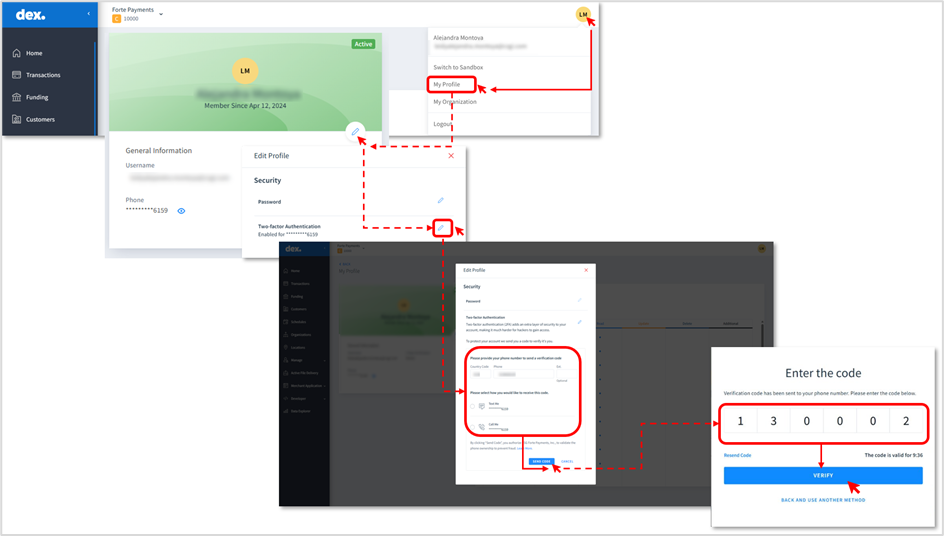
To update the MFA phone number in Dex, you must first log in using your current registered phone number, which is required for identity verification. Once logged:
• Click on the initials name icon located on the upper-right corner and select “My Profile” option.
• In the profile details window, click the pencil icon, and then, the pencil icon located next to the “Two-factor Authentication” option.
• Enter the new phone number in the designed field and choose the preferred method to receive the MFA authentication code (SMS or voice call). After that, click the “Send code” button.
• Type the received code sent to the new MFA phone number and click on “Verify”. If the code is entered correctly, this action will display a successful message, indicating the phone number was updated.
 If you cannot access your current phone number, you need to submit a request through the Support Portal so the update can be applied by CSG Forte.
6. Are there options for MFA that do not require a phone number? |
|
|
Currently, there is no alternative to authenticate in Dex. Using a phone number is required as the verification process relies on sending a secure code to a registered mobile or landline number. However, we are actively exploring additional methods, such as secondary email verification, to provide more flexibility and better accommodate user needs in the future. If any new authentication options are introduced in the future, you will be notified accordingly.
7. What to do if the registered phone number for MFA is unavailable? |
|
|
At CSG Forte, we are committed to safeguarding your Dex account. Currently, access to Dex requires an active phone line for authentication purposes. If you are unable to access your registered phone or experience connectivity issues, please contact CSG Forte Support to request an update to the phone number associated with your Dex profile. This will enable you to regain access to your account in a secure manner.
8. Is it possible to remain logged in longer to reduce MFA prompts? |
|
|
Yes, the “Remember Me” feature allows you to stay logged in to Dex for up to 24 hours on the same device after you successfully verify your identity, reducing how often you need to complete Multi-Factor Authentication (MFA). This helps make your experience more convenient while maintaining strong security. Please note, if you try to log in from a new IP address (even on the same device) you will be asked to complete MFA again within the 24-hour period to ensure your account remains protected.
9. How to provide feedback on the MFA process? |
|
|
Your feedback is important to us, and we are committed to continually enhancing our services. If you have any suggestions or concerns regarding the MFA process, please contact our support team by submitting a ticket here or call 866-290-5400. We will carefully consider your input for future improvements.
Was this article helpful?
That’s Great!
Thank you for your feedback
Sorry! We couldn't be helpful
Thank you for your feedback
Feedback sent
We appreciate your effort and will try to fix the article